Explainer
Golf launch monitors explained: radar vs camera
Golf launch monitors in plain English: how radar and camera units work, which numbers matter, how much space each needs and what to check before you buy.
A launch monitor measures what happens when the club hits the ball, then works out where that ball would have gone. For home practice, that is a big step up from hitting into a net and guessing. You find out how far each club really carries, whether your misses start left or curve left, and whether a change you are working on is making any difference.
This guide explains the two main ways launch monitors measure a shot, what the numbers mean, and what to check before buying one for home.
What a launch monitor does (and does not do)
A launch monitor captures data in the first moments of the shot: the speed of the ball, the angle it leaves at, how fast it spins and which way. From that, it calculates the rest of the flight, including carry distance and curve.
A launch monitor is not the same as a golf simulator. The launch monitor measures. Simulator software takes those measurements and shows the ball flying on a virtual range or course, on a screen or a projector. Many launch monitors can be used on their own with a phone app and can also connect to simulator software later.
Radar launch monitors
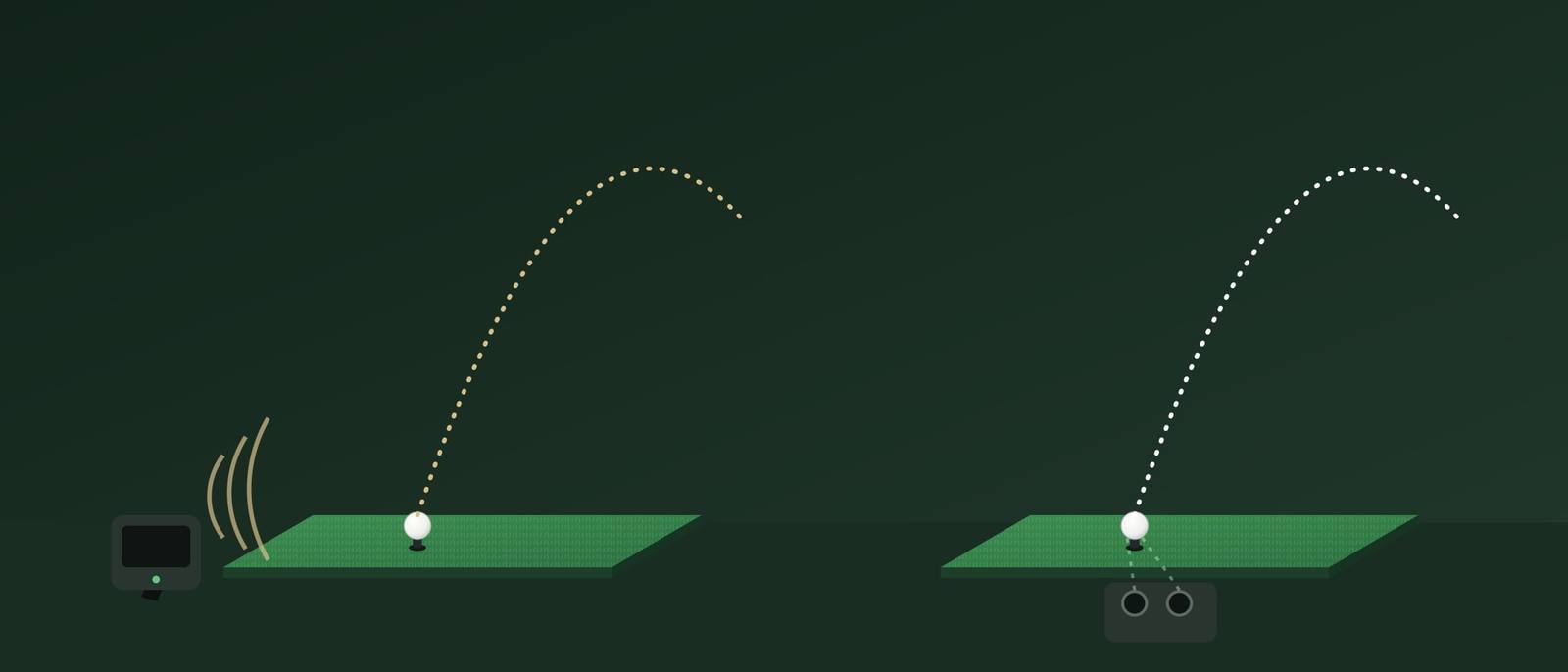
Radar units use the Doppler effect. The unit sends out a microwave signal, which reflects off the moving ball (and on some units the club head). The movement changes the frequency of the reflected signal, and from that change the unit works out speed and direction, tracking the ball as it flies away.
Radar units sit behind the ball, pointing at the target. Because of that:
- they work the same way for left and right-handed players, so nobody has to move the unit;
- outdoors on a range they can follow a good part of the actual flight;
- indoors they need room behind the ball for the unit and enough ball flight before the net or screen.
As an example of the distances involved, one popular portable radar unit asks to be placed 1.8 to 2.4 m (6 to 8 ft) behind the ball, with at least 2.4 m (8 ft) between the ball and the net. Other models ask for different distances, so always check the manual.
Indoors, a radar unit sees only a short piece of the flight. Some figures, especially spin, may then be calculated rather than measured. Some radar units need small reflective stickers on the ball to read spin reliably indoors, and metal objects or reflective surfaces close to the hitting area can disturb readings.
Portable radar units are often the more affordable way into launch monitor data.
Camera (photometric) launch monitors
Camera units use high-speed cameras to take a series of pictures of the ball, and on some models the club, in the moment around impact. From those images they measure launch angle, speed, direction and spin directly. Some read markings on the ball or the club to do this.
Camera units sit beside the ball on the floor, or above it on the ceiling. Because they measure everything in the first few centimetres of the flight:
- they need much less depth than radar units, which makes them popular for indoor bays;
- they measure spin directly rather than calculating it from flight;
- a floor-standing unit has to be moved to the other side of the ball for a left-handed player, while ceiling-mounted units avoid that.
Radar or camera: a quick comparison
| Radar | Camera | |
|---|---|---|
| Position | behind the ball | beside or above the ball |
| Room depth needed | more | less |
| Left and right-handed | same position | floor units move sides |
| Outdoors on the range | strong, sees more flight | works, measures at impact |
| Indoors | needs distance, spin may be calculated | well suited to short rooms |
Which numbers matter?
Launch monitors can show a long list of figures. These are the ones most golfers use:
| Number | What it means | Why it helps |
|---|---|---|
| Ball speed | how fast the ball leaves the club face | the main driver of distance |
| Launch angle | the vertical angle the ball starts at | too low or too high costs carry |
| Launch direction | the start line, left or right of target | shows face angle at impact |
| Spin rate | how fast the ball spins, in rpm | too much spin balloons, too little drops |
| Spin axis | the tilt of the spin | explains why a shot curves |
| Carry | distance through the air | the number to learn for every club |
| Club speed | speed of the club head at impact | tracks speed training |
| Smash factor | ball speed divided by club speed | checks how centred the strike was |
Smash factor is a good example of a number that is simple and useful. If the club is moving at 100 mph and the ball leaves at 150 mph, the smash factor is 1.50. With a driver, values close to 1.50 are about as good as it gets, so a low figure usually means an off-centre strike.
Higher-end units add club data such as club path, face angle and attack angle. They explain why the ball did what it did, but they are only useful if you or your coach know what to do with them.
Measured or calculated?
Spec sheets often list a long row of data points, but not all of them are measured directly. A launch monitor measures a handful of things and calculates the rest from them using a model of ball flight. Carry distance, for example, is always calculated when you hit into a net, because the ball never gets to land.
That is not a problem in itself. Calculated figures can be very useful. But when you compare models, ask which numbers each unit measures and which it calculates, especially for spin, which has a large effect on carry and curve. A unit that measures ball speed, launch angle and spin directly, and calculates carry from them, is working from the numbers that matter most.
It also explains why two launch monitors can disagree on carry for the same shot. They may measure slightly differently, and they may use different flight models and assumptions about conditions. Pick one unit and track your numbers on it over time, rather than chasing a perfect match with a friend's device.
Indoors and outdoors
Most home golfers use a launch monitor in two places: into a net or screen at home, and on the range or practice ground. Outdoors, any unit has more to work with. Indoors, distances and light matter:
- Keep the unit on a level surface and aligned with the target.
- Use the distances from the manual, not a guess.
- Use the same type of ball every time, clean and in good condition.
- For camera units, follow the maker's advice on lighting.
- Calibrate or check alignment if the numbers suddenly look wrong.
Before setting up a bay at home, read our guide on home golf simulator space, which shows how the launch monitor type changes the depth you need.
Questions to ask before you buy
- Where will you use it most? Range, garden net, or an indoor bay?
- How deep is your room? If depth is short, a camera unit may be the only practical choice.
- Who will use it? Left and right-handed players together favour radar or ceiling-mounted units.
- Which numbers do you need? Carry, ball speed and launch cover most practice. Club data is a bonus.
- What does the software cost? Check which features and courses are free and which need a paid plan.
- What does it connect to? Phone, tablet, PC, and which simulator software.
- How is it powered? Battery life matters at the range; a mains option matters in a bay.
You do not need a launch monitor to practise well at home. A net, a good mat and a clear plan go a long way. But if you want to measure progress, or build a simulator later, it is the piece that turns hitting balls into practice with feedback. Have a look at our launch monitors and, for the bay around it, our simulator enclosures.
Frequently asked questions
Is a radar or camera launch monitor better indoors?
Camera units generally cope better with short rooms, because they sit beside the ball and measure everything around impact. Radar units can work well indoors too, but they need space behind the ball and a minimum distance of ball flight before the screen, so check the manual against your room.
What is smash factor?
Smash factor is ball speed divided by club speed. It shows how well you transferred the speed of the club to the ball. With a driver, values close to 1.50 are about as high as it gets, so it is a useful check on how centred your strike was.
Do launch monitors need a subscription?
Some do, some do not, and some have a free basic level with paid extras such as simulator courses or more data. Check what is included and what costs extra before you buy, especially if you plan to use it as a simulator.
Can I use a launch monitor in the garden?
Yes, into a net. Follow the placement distances in the manual, keep the unit level and pointed at the target, and protect it from rain. Most units are made for the range and the net, so the garden is a normal place to use one.